Navigate ROS
When you log in to ROS, the Place Order page opens.
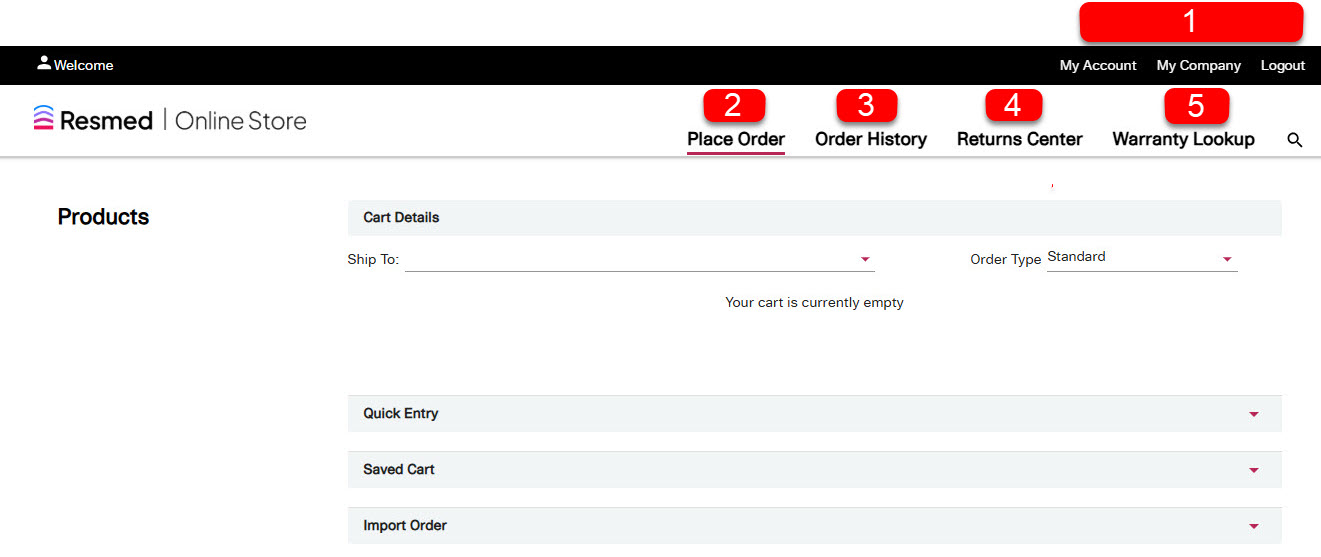
Use the menu items and tabs to view your account and company details, manage orders, returns, report serious incidents and see warranty information.
Top menu
My Account: See the information for your account, such as your profile, manage your email address for ROS confirmation (the company email you add to copy transactions to) and change your password.
My Company: Manage addresses and users in your company. You can manage users for your company if you have the appropriate permissions assigned to your role.
Logout: Log out of ROS.
Place Order: Select this tab to place orders for Resmed products.
Order History: Select this tab to view all orders.
Returns Center: Select this tab to create a service return, view returns history and submit a serious incident (adverse event) report.
Warranty Lookup: Select this tab to see the warranty information for a product with a serial number (for example, PAP device).
You can use the search icon next to the Warranty Lookup tab to search for products in ROS.